Listener Management
What is a listener?
- defines the protocol and parameters by which a Beacon payload will communicate with team server
- protocols provided by CS are: DNS, HTTP, HTTPS, SMB, TCP
- protocols are provided to disguise the network activity generated by a Beacon to look like traffic
Listener Types
Egress:- communicates directly to team server through the network boundary of teh target enviornment.
- DNS and HTTP/S are egress listeners
Peer-to-Peer:- does not communicate directly with the team server directly
- has traffic routed through another beacon instead
- multiple P2P beacons can be chained together but will ultimately be clinked to an egress Beacon to reach the team server
- SMB and TCP are P2P listeners
HTTP Listener
- directs beacon to communicate via HTTP GET and /or POST
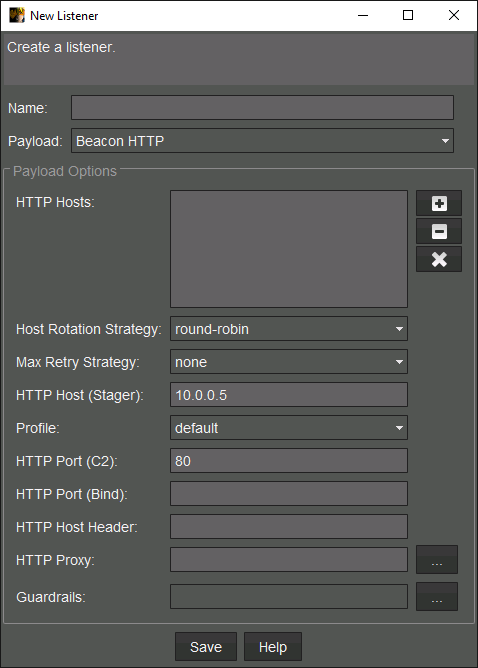
HTTP hosts
- the hosts that the beacon will send its HTTP requests to which may be IP addresses or domain names
- can resolve to team server or to redirector
HTTP rotation strategy
- if more than 1 HTTP host is provided, a rotation strategy tells the beacon how it should use each one
- good for resiliency if one host gets blocked
- Options:
Round robin,Random,Failover,Rotate
Max Retry Strategy
- configures Beacon's self destruct strategy in cases where all HTTP hosts become lost or blocked
None: Becon will not exit and continue to run indefinitely unless terminatedExit: The syntax =exit-[max_attempts]-[increase_attempts]-[duration][m/h/d]max_attempts: number of consecutive failed attempts before beacon will exitincrease_attempts: number of consecutive attempts before beacon increases sleep timeduration: number of hours, minutes, or days to set the new sleep time to
- Example =
exit-50-25-1h:- tells the beacon to increase its sleep time to 1 hour after 25 failed attempts and then exit if reaches 50 failed attempts
HTTP host (stager)
- only used by stager payloads
- even with multiple HTTP hosts, stager payload can only use single host to fetch full payload
- you can use the same IP/dmain as existing HTTP host entry or a different one entirely
Profile
Malleable C2 profiles can be configured with multiple traffic variants, which can be selected from this dropdown
HTTP port (C2)
This is the HTTP port Beacon will attempt to connect to the team server on. Unless you want to use a non-standard port, you will in most cases keep this in-line with a port appropriate for the protocol. For example, 80 or 8080 for HTTP.
HTTP port (bind)
- port that the team server will bind its built-in web server to
- if no option specified, it will use same port as above
- only set this port if you want to perform "port bending" = using a redirector that listens on one port but sends on another
- useful for running multiple listeners on same team server but keeping all beacons on port 80
HTTP host header
Setting a host header here will propagate it into the Beacon payload without having to explicitly set it within a Malleable C2 profile. This makes it more convenient to leverage domain fronting without hardcoding the domain in any of your profiles.
HTTP Proxy
By default, Beacon will attempt to use the internet proxy configuration of the system it is running on. However, you can hardcode HTTP or SOCKS proxy information for the Beacon to use instead if required. This configuration is not applied to payload stagers.
Guardrails
- prevents stageless payloads from running unless specified criteria has been met
- useful in cases where your payloads are copied or forwarded outside of target environment
- examples:
- Phishing: email being forwarded from a victim to an external party
- Blue teamer: trying to analyze the payload in a sandbox
DNS listener
Directs Beacon to communicate with a team server via DNS requests - specifically A, AAAA, or TXT record lookups. The team server starts a built-in DNS server to serve the requests.
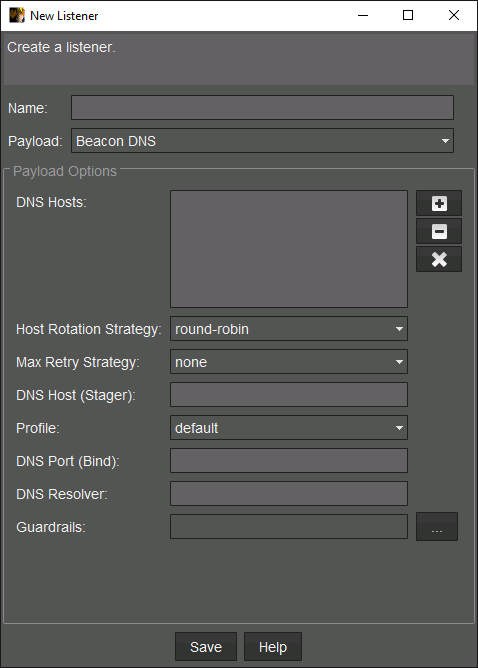
- in order for it to work, must add necessary DNS records to make team server authoritative for one or more subdomains
- most cases will have the domain registration as the auth domain
- How it works:
- DNS beacon checks into team server by performing an
Arecord lookup for domain set in DNS listener - DNS beacon does not transmit its metadata right away
- This causes new DNS Beacons to initally appear as 'empty' rows with no info
- metadata is not sent until beacon is tasked with a job
- use
checkincommand to transmit the metadata
- DNS beacon checks into team server by performing an
DNS resolver
- default uses whatever the running computer is configured with
- can overwrite this with custom DNS resolver by entering the IP/hostname in this field
SMB listeners
- does note bind or listen to the team server VM
- only serves as a template for payload generation
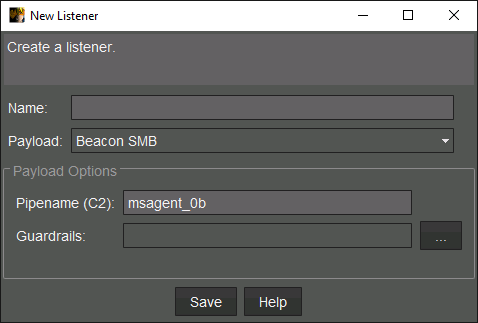
- when executed, creates SMB named pipe using pipename specified in the listener config
- then requires another beacon to connect to that named pipe and relay traffic between SMB beacon and the team sever
- done over SMB on 445
- by default, CS uses
msagent_##as the named pipe, where##are random hex values
TCP listeners
- similar to SMB, does not direct the team server to listen on any TCP ports
- provides config info when generating TCP Beacon payloads
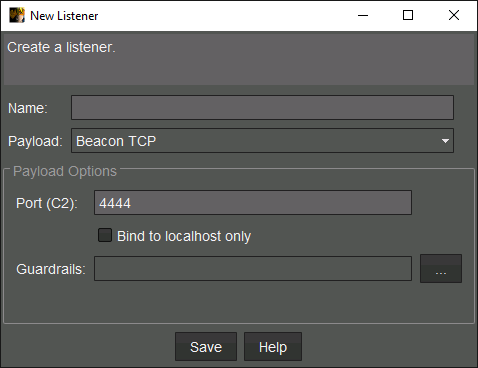
- How it works
- when executed, the TCP payload will bind and listen on the specified C2 port
- then requires another beacon to connect to that port to relay traffic between beacon and team server
- if
Bind to localhost onlyis not checked, it will bind to0.0.0.0, otherwise127.0.0.1 - a listener that binds to
0.0.0.0can be used for lat movement - a listener that binds to
127.0.0.1can be used for privilege escalation